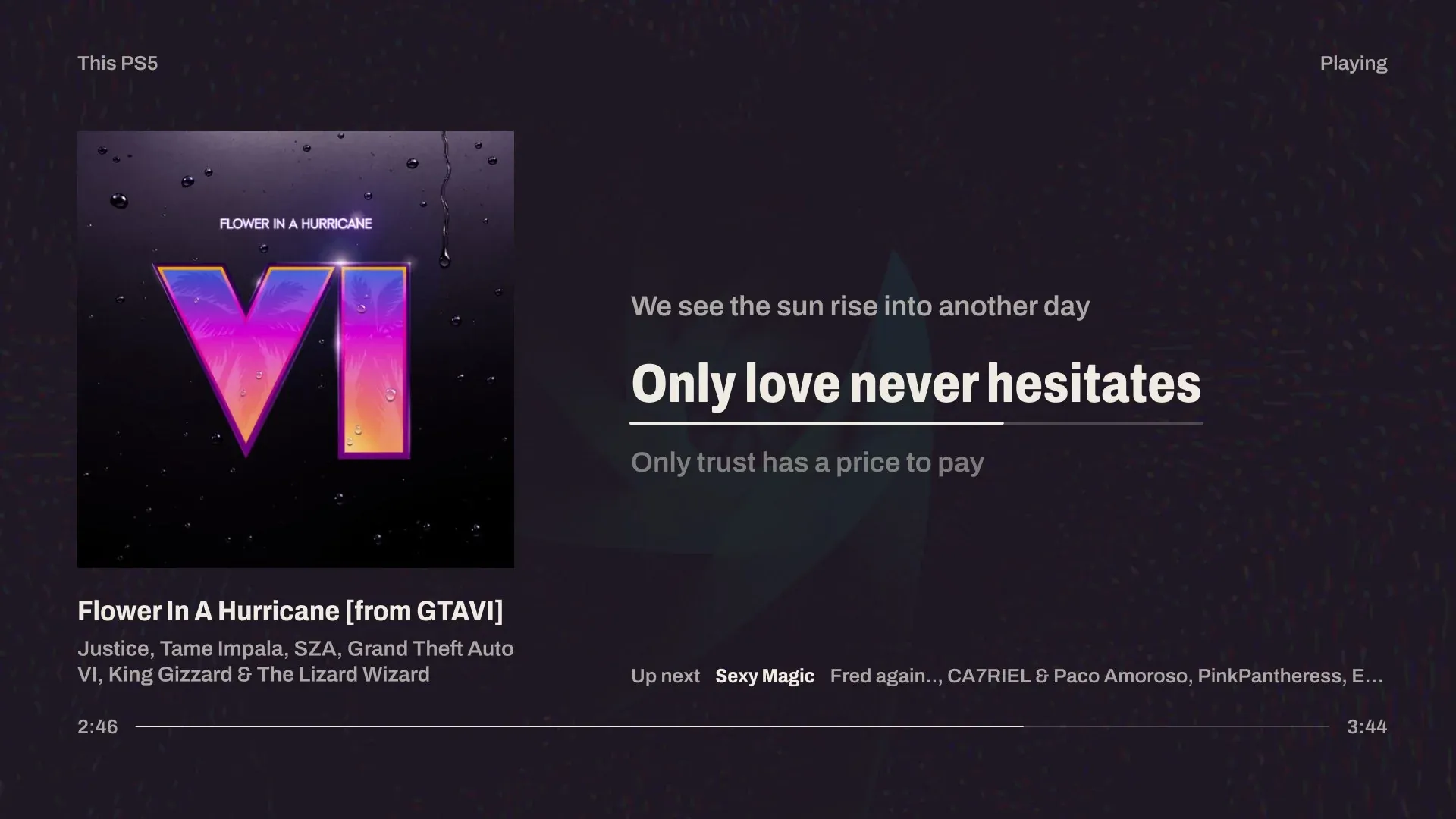
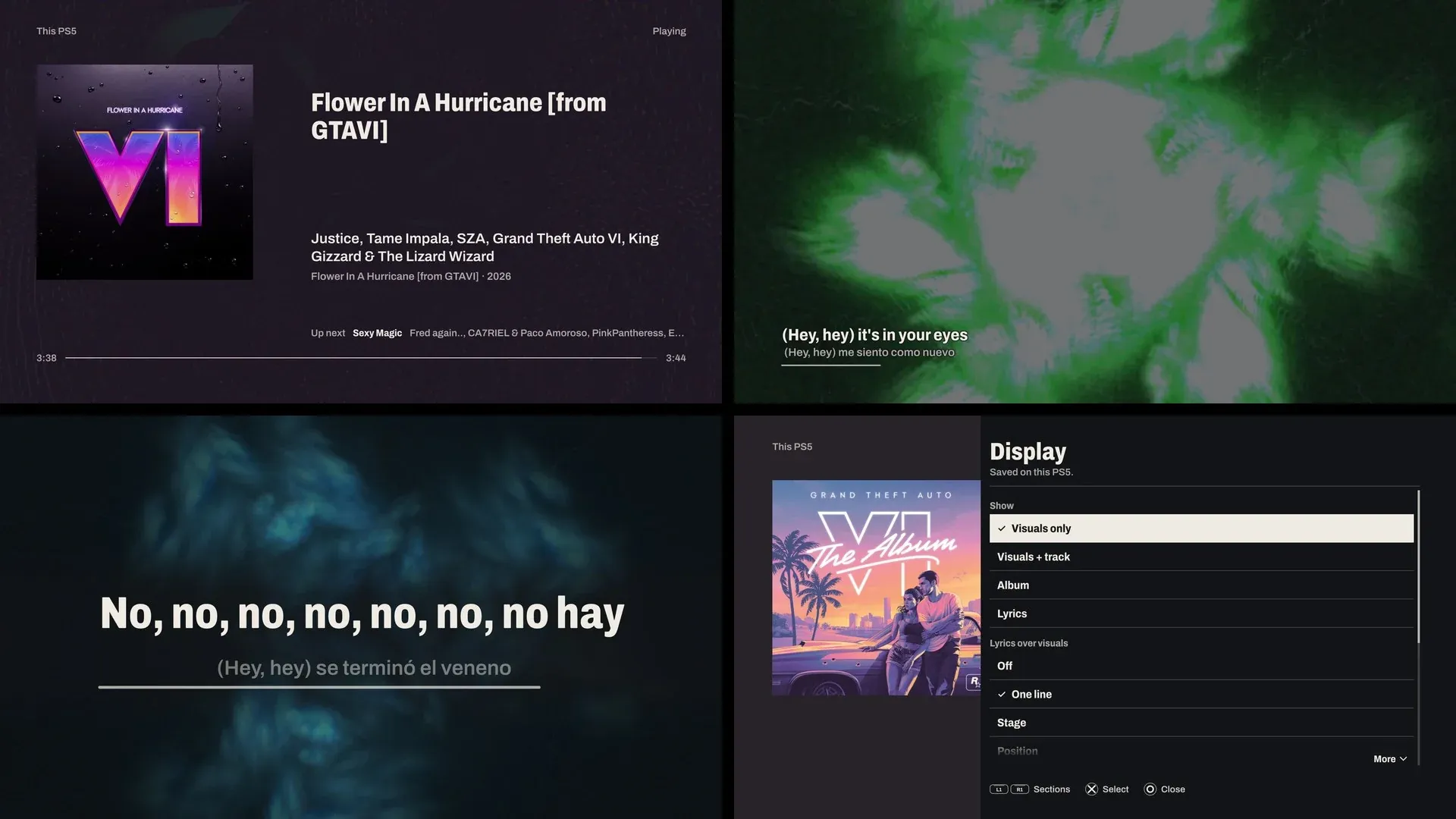
An unofficial Music Assistant player for a jailbroken PS5. It joins Music Assistant as a speaker and plays through the console, shows the artwork, word-by-word lyrics and the queue, lets you browse and play with a DualSense, and draws MilkDrop visuals from the music you hear. It can also follow another speaker and draw what that speaker plays, without sounding a second copy.
It is the PS5 twin of Afterglow for LG webOS: the same poster design and the same Music Assistant account, written natively in C++ and OpenGL for the console.
Afterglow is independent of, and not endorsed by, Music Assistant or Sony Interactive Entertainment. It is built on BlackBearReloaded's ps5-homebrew-ui and keeps its licence, GPL-3.0-or-later.
What it does
- Plays on the PS5. Afterglow connects to Music Assistant's Sendspin server, so the console appears in Music Assistant as a speaker called Afterglow PS5. Play to it from Music Assistant, or from Afterglow's own Browse.
- Follows a speaker. Set the source to a speaker (or Active speaker) and the PS5 draws whatever it plays, through Music Assistant's MilkDrop Visualizer plugin, while staying silent itself.
- Album, Lyrics and Visuals views. Album shows the whole artwork with the song, artist and up next. Lyrics shows timed lyrics with the current line leading, word by word when the lyrics carry word timing, and plain lyrics paged by hand. Visuals is MilkDrop on its own or with a track card, and MilkDrop can keep running behind the artwork.
- Lyrics from Music Assistant, with an online fallback. When Music Assistant has none, the PS5 looks the song up on LRCLIB itself (see Privacy). Lyrics timing moves the words up to 10 s earlier or later (and can be kept for one song), Retry lyrics asks again, Choose other lyrics swaps wrong lyrics for another LRCLIB version, and Go to a line plays the song from a chosen line.
- Browse and Search. Search with the system keyboard, recently played, favourite playlists, albums, songs and artists, radio, podcasts and audiobooks, artist pages. Play now, play next, add to the queue or start radio.
- Queue. Play, move and remove upcoming songs; shuffle, repeat, crossfade, keep playing when the queue ends, volume and sleep timer. Playing on picks the speaker and says what each one plays; picking a silent one moves the music there. Join adds the console to the music playing elsewhere and Move here brings that music to it. Speakers together joins or leaves a sync group and sets each member's own volume.
- Playlists and tonight's programme. Save the queue as a playlist, or add a song to one, named without a keyboard. With nothing playing, the idle poster offers the evening's songs set as a concert programme, which can be kept as a playlist.
- Presets. 395 MilkDrop presets (393 enabled) through projectM. A preset scan measures each one on your console and keeps the ones that run smoothly. Presets can take their colours from the artwork, and favourites are shared with Music Assistant and your LG TVs.
- Sound & sync. TV output compensation sets this PS5's delay in Music Assistant, so it plays in time with your other speakers; picture and lyrics timing have their own control. 30, 60 or 120 fps.
- Scan to save. Details shows a QR code that opens the playing song on your phone, on the streaming service it came from.
- Check my setup. A pass/fail list (Music Assistant, sign-in, this PS5 as a speaker, the MilkDrop Visualizer plugin, the clock, online lyrics, the preset scan), each failure with one plain next step.
- Light bar and Home. The DualSense light bar takes the artwork's colour, and an optional Home section shows a few Home Assistant sensors and switches.

Requirements
- A PS5 that runs homebrew: a jailbreak with a homebrew enabler that starts native titles from
/data/homebrew/<TITLE_ID>, such as ShadowMount Plus, and an FTP server to copy the app across. The setup guide has the details. - Music Assistant 2.10 or newer on the same network, reachable by its numeric IPv4 address. To follow other speakers, also its MilkDrop Visualizer plugin.
- For following, speakers Music Assistant streams to itself (Sonos, Chromecast, AirPlay, Squeezelite, ...). A speaker playing on its own, such as Spotify straight from the Spotify app, carries nothing to draw.
Status: Afterglow has run on one PS5, on system software 7.20; the pictures here are screenshots from it. Checked there with 1.6.0: playback through the console at 59.9–60 fps, artwork, online lyrics, Browse, the controls, the queue, the Display settings and lyric overlays, and the Home section. Signing in with the system keyboard, the light bar and 120 Hz have been tested on a PC (unit tests, mock servers and the off-screen preview) but not yet on a console. Other consoles, firmware versions and homebrew enablers haven't been tried. Reports either way are very welcome.
Install
Download PPSA99481.zip from the releases, or build it
(below). Extract it and copy the PPSA99481 folder to /data/homebrew/ on the console over FTP. Wait for your
homebrew enabler to register the title, then start Afterglow from the home screen; it sits with the media apps, not the games.
Sign in with Options → Settings → Account → Sign in: the system keyboard asks for Music Assistant's address,
your username and password. The PS5 keeps its own long-lived token, named after the console, which you can revoke
in Music Assistant or with Log out; the password is not stored. Then choose Afterglow PS5 as the speaker in
Music Assistant and play something. The setup guide walks through every step, including the
optional afterglow.conf.
Controls
On the poster or the visuals, with nothing open:
| Button | Does |
|---|---|
| Cross | Play / pause |
| L1 / R1 | Previous / next song |
| D-pad left / right | Back / ahead 10 seconds |
| D-pad up / down | Volume; pages plain lyrics in the Lyrics view |
| Square | Visuals only, Visuals + track, Album, Lyrics |
| Triangle | Lyrics over the visuals: off, one line, stage |
| L2 / R2 | Previous / next preset; in the Lyrics view, lyrics earlier / later |
| L3 | Lock the preset |
| R3 | Favourite the preset |
| Options | The playback controls and the Browse, Now playing, Queue and Settings sheets |
| Hold Circle | Close Afterglow (1.5 s) |
In the sheets, up and down move, left and right change a value, Cross selects, Circle goes back and Options closes everything. The full list is in docs/AFTERGLOW.md.
Settings
Press Options for the playback controls: a row of tiles (previous, play, next, back and ahead 10 s, favourite, Details, Display) and a strip with Browse, Now playing, Queue, Settings and, once configured, Home. Settings holds the source, visuals and presets, lyrics timing, sound and sync, the account and a status page, and Check my setup. Settings for this console are kept on the console and, with Sync settings with Music Assistant on, in your Music Assistant account; preset favourites are shared with your other Afterglows. Every row is described in docs/AFTERGLOW.md.
Privacy
Afterglow talks to your Music Assistant server: Sendspin for the audio, its API for artwork, lyrics, the queue and your library, and the MilkDrop Visualizer relay when following a speaker. Artwork comes through Music Assistant's image proxy. With a Home section configured, it also talks to your Home Assistant, subscribing only to the entities you list.
The one other service is lyrics. When Music Assistant has none for a song, the PS5 asks lrclib.net directly over HTTPS, sending only the song's title and first artist (no account, token or device id). Choose other lyrics sends the same search, and a song whose lyrics you chose is fetched by that LRCLIB record's id. LRCLIB sees the request coming from your network. Turn Online lyrics off (Options → Settings → Lyrics) to stop it; it is on by default.
Check my setup asks lrclib.net for one fixed record (/api/get/1: no song, nothing about you) to see that it
answers, only when you run it and Online lyrics is on. The Scan to save code in Details is drawn on the console from
the link Music Assistant already sent; nothing is sent.
The console stores its Music Assistant token in the app's own storage (/download0/hui/afterglow.auth), never your
password. A token or Home Assistant token you put in afterglow.conf sits in the install folder, which anything with
FTP access to the console can read. There is no analytics or telemetry. The dev request path for checking a console
from a PC is off unless you turn it on.
Development
The build runs in a Linux container (native on ARM64 and x86-64; on a Mac, Colima or another local Docker works) and cross-compiles for the PS5 with the public PS5 Payload SDK:
docker build -f Dockerfile.afterglow -t afterglow-builder .
docker run --rm -v "$PWD:/work" afterglow-builder make app    # dist/PPSA99481/ and dist/PPSA99481.zip
docker run --rm -v "$PWD:/work" afterglow-builder make test-unit
docker run --rm -v "$PWD:/work" afterglow-builder make lint
The interface also renders on a PC, off-screen, with the same code and shaders. The README images above were captured on a PS5 running 1.6.0. To render a preview with made-up music and an invented cover:
AFTERGLOW_PREVIEW=1 AFTERGLOW_COVER=docs/images/preview-cover.png AFTERGLOW_LYRICS=karaoke \
  tools/host-snapshots.sh build/afterglow-preview afterglow
docs/AFTERGLOW.md covers the configuration file, the preset scan, the checks and what has not been verified on hardware. AGENTS.md is the guide for working in the repository (for people and coding agents alike), and docs/UI_KIT.md introduces the ps5-homebrew-ui kit underneath. See the changelog.
Support
Afterglow is free and open source. If it made your setup better, you can buy me a coffee. Bug reports and pull requests are just as welcome.
Credits
- ps5-homebrew-ui by BlackBearReloaded (GPL-3.0-or-later), the kit, build and packaging Afterglow is built on, with ps5-native-app-boilerplate and ps5-opengl.
- The PS5 Payload SDK by John Törnblom (ps5-payload-dev).
- projectM (LGPL-2.1-or-later), the MilkDrop renderer.
- butterchurn-presets and the MilkDrop preset authors.
- Archivo typeface (SIL OFL 1.1).
- jsmn (MIT) and stb (public domain or MIT).
- QR Code generator by Project Nayuki (MIT), for Scan to save.
- Lyrics fallback by LRCLIB.
Full notices, with what the app folder ships, are in THIRD_PARTY_NOTICES.md.
Licence
GPL-3.0-or-later; see LICENSE. Afterglow's additions are by Hayden Griffin; the ps5-homebrew-ui code it is built on is Copyright © 2026 BlackBearReloaded. Third-party components keep their own licences.
Disclaimer
- No affiliation. "PlayStation", "PS5" and "DualSense" are trademarks of Sony Interactive Entertainment Inc. Music Assistant is its own project. Neither endorses Afterglow.
- No proprietary material. No Sony SDK, firmware, encryption keys or decrypted system modules are included.
- Use at your own risk. Running homebrew requires a modified console, which may void its warranty, breach the platform's terms of service, or cause data loss. Afterglow is provided "as is", without warranty; see sections 15 and 16 of the GPL.
- Legal use only. Use it only with hardware, accounts and music you own or are licensed to play.