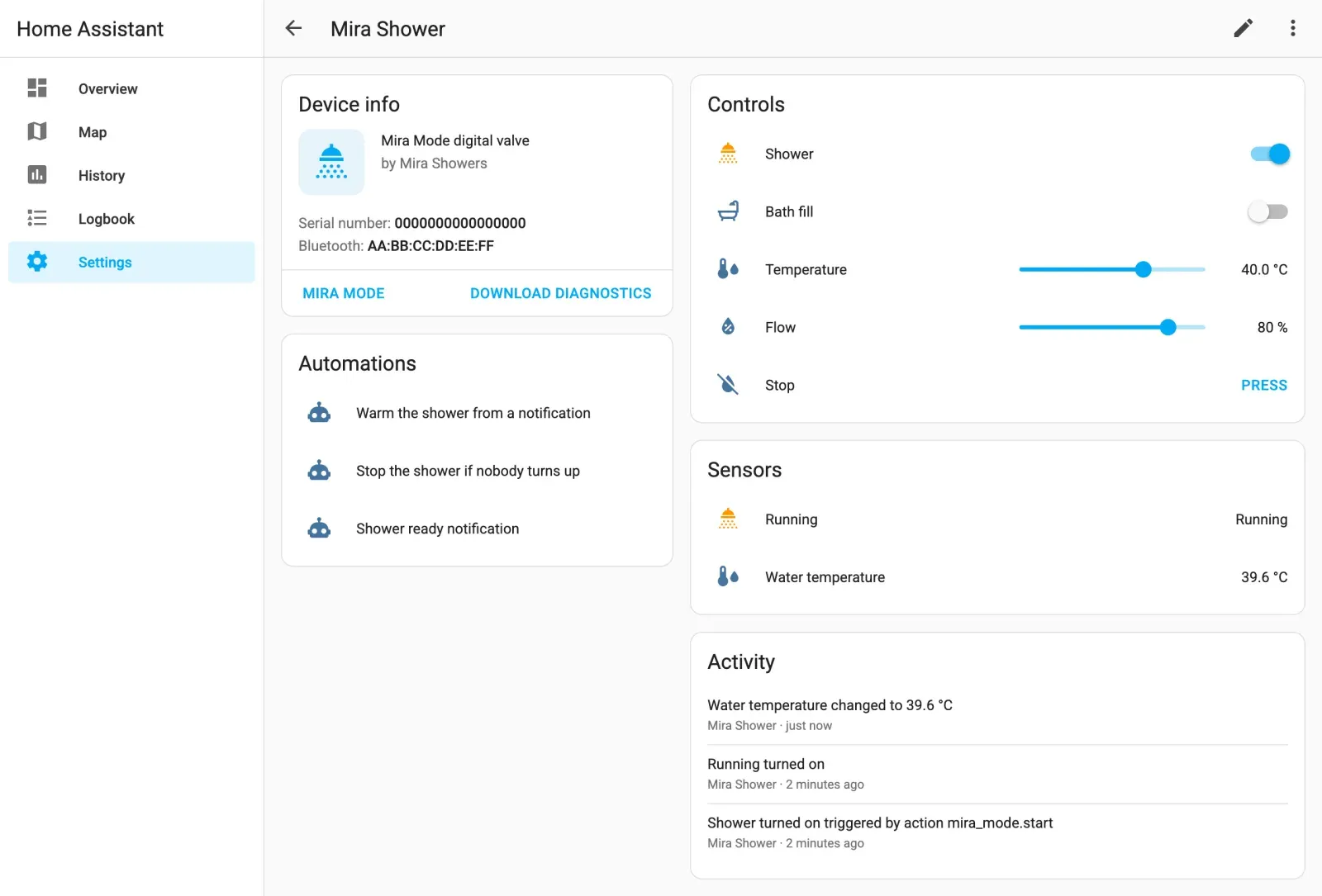
Local control of Mira Mode digital showers from Home Assistant over Bluetooth LE. You can start and stop each outlet, set the temperature and flow, watch the water warm up, and count the water and heat each shower uses. It works with a local Bluetooth adapter or an ESPHome-style Bluetooth proxy, needs no cloud, and you don't have to leave the Mira app running anywhere.
It's the only Home Assistant integration for Mira Mode valves. It is built on the protocol work of ryan-shaw/mira-mode-control.

Illustration with demo values.
Warning
This controls real hot water. Read the safety notes before you automate anything. Home Assistant is not a safety system, and nothing here replaces the valve's own temperature limit or your plumber's thermostatic protection.
Contents
- Features
- Supported hardware
- Installation
- Pairing and setup
- Removal
- Entities
- Actions
- Events
- Automation examples
- How it talks to the valve
- Troubleshooting
- Safety
- Development
- Credits
Features
- Bluetooth discovery. Valves within range of any connectable adapter or proxy show up under Settings → Devices & services.
- Guided pairing. The setup flow bonds with the valve while it is in pairing mode, or uses a bond the adapter already has.
- Per-outlet switches, labelled to match your plumbing (Shower, Bath fill, Handset and so on). Outlets your unit doesn't have can be hidden.
- Temperature and flow controls. Changes apply live while the valve is running. While idle they become the settings for the next start. If you change the temperature on the dial or in the Mira app, Home Assistant picks it up.
- Water and energy tracking. Live flow rate, the cold supply temperature,
the valve's record of the last run (duration, litres, temperature), and
running totals of water used and heating energy that survive restarts and
work with the Energy dashboard. A
mira_mode_usageevent fires for each finished run. - The valve's own limits per outlet (maximum temperature, maximum duration, default flow) as diagnostic sensors.
- A
mira_mode.startaction that sets the temperature and flow and starts an outlet in one step, built for automations and notification buttons. - Commands are confirmed. Every command must be acknowledged by the valve and then read back as done, or the action raises an error. Silence never counts as success.
- Built-in limits of 30-45 °C, a Stop button that stays available even when a poll fails, diagnostics download, translations, and re-pairing through Reconfigure.
Supported hardware
| Valve | Status |
|---|---|
Current-generation Mira Mode valves (they advertise the BLE service 267f0001-eb15-43f5-94c3-67d2221188f7) |
Supported |
Older Mira Mode valves (they advertise bccb0001-ca66-11e5-88a4-0002a5d5c51b and pair by client id/slot) |
Not supported. Discovery recognises them and stops. |
Development and live testing used a current-generation dual-outlet valve. Status reads and remote start and stop were verified on it through a Bluetooth proxy.
0.2.0 status: the protocol, start and stop, and the reads added in 0.2.0 (cold inlet, flow rate, last run, outlet limits) were proven on hardware with an earlier, YAML-configured version of this code; the last run and the outlet limits match what the Mira app shows. The setup flow, in-flow pairing and per-outlet switching are covered by tests against a simulated valve but haven't been run on a real valve yet. The hot inlet temperature is experimental (see Entities). The dial-model pairing menu and the ten-device limit haven't been checked on a valve here either, and CI tests against Home Assistant 2026.9. Reports either way are very welcome.
Other valves in the current range should work, but only the outlets your unit actually has will do anything.
Bluetooth: you need a connectable adapter or proxy that can reach the valve and that can hold a bond with it. For example:
- the host's own adapter (BlueZ), if it is close enough
- an ESP32 running ESPHome with
bluetooth_proxy: active: true - any other active proxy that supports pairing
Home Assistant: 2025.10 or newer.
Installation
HACS (recommended)
- In HACS, open the menu (⋮), then Custom repositories.
- Add
https://github.com/HaydenGriffin/ha-mira-modewith type Integration. - Search for Mira Mode, install it, and restart Home Assistant.
Manual
- Copy
custom_components/mira_modeinto your Home Assistantconfig/custom_components/folder. - Restart Home Assistant.
Pairing and setup
The valve only talks over a bonded Bluetooth connection. It also only accepts one connection at a time. Most setup problems come from one of these two facts.
- Close the Mira app on every phone and tablet near the valve. If the app is connected, Home Assistant can't connect.
- In Home Assistant, go to Settings → Devices & services. Either accept the discovered Mira Mode device, or select Add integration → Mira Mode and pick the valve (or type its Bluetooth address).
- Choose Pair now.
- Put the valve in pairing mode. Press and hold the button on the front of the controller for about 5 seconds, until it flashes. On a dial model, go to Menu → Settings → Connect.
- Select Submit within about 30 seconds. Home Assistant bonds, reads the valve's name, serial number and state, and creates the device. No water runs during setup.
- Optional: open Configure on the integration and give each outlet a label. Clear a label to hide an outlet your unit doesn't have. The valve's presets in the Mira app show which outlet feeds what.
The bond lives on the adapter, not on Home Assistant
The bond is stored by the specific adapter or proxy that made it. Home Assistant connects through whichever connectable adapter has the best signal and a free connection slot, and you can't pin it to one. This has some consequences:
- A bond created on a different adapter, proxy or phone does not carry over.
- If you have several proxies in range of the valve, pair through the one that will actually be used. That's normally the closest one. The simplest setup is one pairing-capable proxy that is clearly closer than the others.
- If you move a proxy, add a closer one, or the proxy loses its bond (for example after a factory reset), entities go unavailable. Open the integration, choose Reconfigure, and pair again.
- If the proxy can't pair. Some proxies report errors such as
Pairing failed due to error: 129. In that case, create the bond on the device that runs the proxy and pick This adapter is already paired during setup. For example, use the Bluetooth settings of an Android tablet that runs a proxy app, orbluetoothctlon a Linux host. - The valve stores up to ten paired devices.
Removal
- In Settings → Devices & services → Mira Mode, open the valve's entry menu (⋮) and select Delete.
- If you installed through HACS, remove Mira Mode in HACS and restart
Home Assistant. For a manual install, delete
config/custom_components/mira_modeand restart. - Optional: unpair the valve from the adapter or proxy that bonded with it,
for example
bluetoothctl remove AA:BB:CC:DD:EE:FFon a Linux host, or the Bluetooth settings of the device running the proxy.
Entities
Example ids below assume a new valve named Mira Shower, set up with the
default labels and then relabelled: outlet 1 Shower, outlet 2 Bath fill.
See entity ids for why the ids still say outlet_1.
| Entity | Example id | What it does |
|---|---|---|
| Switch, one per labelled outlet | switch.mira_shower_outlet_1, shown as Shower |
Opens or closes that outlet at the current Temperature and Flow. Other running outlets keep running. |
| Number: Temperature | number.mira_shower_temperature |
Target water temperature, 30-45 °C in 0.5 ° steps. Applied live while running. Follows the valve's own target while running. Restored after a restart. |
| Number: Flow | number.mira_shower_flow |
Flow, 1-100 %. Applied live while running. Note that the Mira app shows flow on a 0-25 scale, so 100 % here is 25 there. |
| Button: Stop | button.mira_shower_stop |
Turns every outlet off and leaves the valve's temperature setting alone. Stays available even if the last poll failed. |
| Binary sensor: Running | binary_sensor.mira_shower_running |
On while any outlet is open, whoever started it. |
| Sensor: Water temperature | sensor.mira_shower_water_temperature |
Measured water temperature at the valve. Near room temperature while idle. |
| Sensor: Flow rate | sensor.mira_shower_flow_rate |
Litres per minute flowing now, 0 while idle. The valve reports flow as a percentage of 25 L/min, and it ramps up for a few seconds after a start. |
| Sensor: Cold inlet temperature | sensor.mira_shower_cold_inlet_temperature |
Temperature of the cold supply. |
| Sensor: Hot inlet temperature | sensor.mira_shower_hot_inlet_temperature |
Experimental, disabled by default. Which bytes carry the hot supply temperature isn't proven yet, so don't rely on the value. It has a raw attribute with the valve's whole reply; if you enable it, a diagnostics download taken during a shower helps settle it. |
| Sensor: Last run duration, water used, temperature | sensor.mira_shower_last_run_duration, ..._last_run_water_used, ..._last_run_temperature |
The valve's own record of the last finished run, whichever outlet and whoever started it: seconds, whole litres and the blended temperature (to 0.5 °C). |
| Sensor: Water used | sensor.mira_shower_water_used |
Running total in litres (total_increasing). Each finished run is added once. |
| Sensor: Water heating energy | sensor.mira_shower_water_heating_energy |
Running total in kWh: the heat that took each run's water from the cold inlet temperature to its blended temperature. An estimate of heat delivered, not of what your boiler burned. Runs finished before the cold inlet has been read add nothing. |
| Diagnostic sensors, per labelled outlet: max temperature, max duration, default flow | sensor.mira_shower_outlet_1_max_temperature, ..._max_duration, ..._default_flow |
The limits and default the valve applies to that outlet, as set in the Mira app. Read every 30 minutes. |
Entity ids
An entity id is made from the entity's name when the entity is first created,
and doesn't change after that. A new valve starts with the labels Outlet 1
and Outlet 2, which is where outlet_1 and outlet_2 in the ids above come
from; relabelling later only changes the name shown. An entity created after
you set a label takes its id from the label instead. For example, labelling
outlet 3 Handset later gives switch.mira_shower_handset, and upgrading
from 0.1.0 with outlet 2 already labelled Bath fill gives
sensor.mira_shower_bath_fill_max_temperature. The device page shows the
real ids.
How the totals count
The valve only reports its most recent run. The totals add that record each time a new, distinct one is observed, which leaves some gaps:
- If several runs finish while the valve is out of reach, only the latest is counted when it is reachable again; the earlier ones are lost.
- After a restart or reload, the first record seen only sets a baseline and is not counted, so a run that finished while Home Assistant was down is lost.
- A record identical to the previous one (same seconds, litres and temperature) looks like the same run and is not counted again.
For daily, weekly or monthly figures, use the Energy dashboard, statistics, or a utility meter on top of the totals.
Actions
mira_mode.start
Starts the targeted outlet switch at the given temperature and flow, and saves them as the new settings. Both fields are optional. If you leave one out, the current setting is used.
action: mira_mode.start
target:
  entity_id: switch.mira_shower_outlet_1
data:
  temperature: 40   # 30-45 °C
  flow: 80          # 1-100 %
To stop, use switch.turn_off on an outlet, or press the Stop button.
Events
mira_mode_usage
Fired for each newly observed, distinct last-run record, on the first idle poll that sees it (usually within a minute of the run ending). These are the same records that are added to the totals, with the same gaps: see how the totals count.
| Field | Meaning |
|---|---|
device_id |
The valve's device |
seconds |
How long the run lasted |
litres |
Water used, in whole litres |
temperature |
Blended water temperature in °C, to 0.5 ° |
energy_kwh |
Heating energy in kWh, or null if the cold inlet hasn't been read |
- alias: Log each shower
  triggers:
    - trigger: event
      event_type: mira_mode_usage
  actions:
    - action: logbook.log
      data:
        name: Shower
        message: >
          {{ (trigger.event.data.seconds / 60) | round(1) }} min,
          {{ trigger.event.data.litres }} L at {{ trigger.event.data.temperature }} °C
Automation examples
Warm the shower from a phone notification
Offer to start the shower. It only runs when someone taps the button, so it never starts on its own.
- alias: Offer to warm the shower
  triggers:
    - trigger: time
      at: "06:45:00"
  conditions:
    - condition: state
      entity_id: person.alex
      state: home
  actions:
    - action: notify.mobile_app_alex_phone
      data:
        title: Shower
        message: Warm it up for you?
        data:
          actions:
            - action: MIRA_WARM_SHOWER
              title: Start at 40 °C

- alias: Warm the shower when asked
  triggers:
    - trigger: event
      event_type: mobile_app_notification_action
      event_data:
        action: MIRA_WARM_SHOWER
  actions:
    - action: mira_mode.start
      target:
        entity_id: switch.mira_shower_outlet_1
      data:
        temperature: 40
        flow: 80
Stop the shower if nobody turns up
This is the safety net for any remote start. If there's no motion in the room within five minutes of the water starting, the shower stops and you get a notification.
- alias: Stop the shower if nobody turns up
  triggers:
    - trigger: state
      entity_id: binary_sensor.mira_shower_running
      to: "on"
  actions:
    - wait_for_trigger:
        - trigger: state
          entity_id: binary_sensor.bathroom_motion
          to: "on"
      timeout: "00:05:00"
      continue_on_timeout: true
    - if:
        - condition: template
          value_template: "{{ wait.trigger is none }}"
      then:
        - action: button.press
          target:
            entity_id: button.mira_shower_stop
        - action: notify.mobile_app_alex_phone
          data:
            message: Nobody turned up, so the shower was stopped.
Tell me when it's ready
- alias: Shower ready
  triggers:
    - trigger: template
      value_template: >
        {{ is_state('binary_sensor.mira_shower_running', 'on')
           and states('sensor.mira_shower_water_temperature') | float(0)
               >= states('number.mira_shower_temperature') | float(99) - 1 }}
  actions:
    - action: notify.mobile_app_alex_phone
      data:
        message: >
          The shower is ready
          ({{ states('sensor.mira_shower_water_temperature') }} °C).
Hard limit on run time
- alias: Shower running too long
  triggers:
    - trigger: state
      entity_id: binary_sensor.mira_shower_running
      to: "on"
      for: "00:30:00"
  actions:
    - action: button.press
      target:
        entity_id: button.mira_shower_stop
How it talks to the valve
- Idle: about once a minute, Home Assistant connects, reads the state, the inlet temperatures and the last run, and disconnects. The valve is free for the Mira app the rest of the time. Every 30 minutes the same connection also reads each labelled outlet's settings.
- Running: the connection stays open and the same reads happen every 10 seconds. While the shower runs, the Mira app can't connect. If a poll fails (often because the Mira app got the connection first), polling drops back to once a minute until a read succeeds.
- Unanswered reads: replies carry no reference to the request, so if any read times out the connection is dropped and the rest of that poll's reads are skipped (a late reply could otherwise be mistaken for the next answer). An extra read the valve doesn't answer is then skipped for 1, 2, 4... polls (at most 32) before it is tried again, so it can't slow every poll down. The diagnostics download lists any that are backing off.
- Inlet temperatures expire after 10 minutes without a fresh reading, so heating energy is never estimated from an old cold inlet value.
- Commands: each
SET_OUTLETScommand names the complete set of running outlets, with the temperature in tenths of a degree and the flow as a percentage. The valve must acknowledge it, and a state read straight afterwards must show the requested outlets running, or the action fails. Stopping sends a temperature of 0, which tells the valve to keep its setting. - This polling design is why the integration is
local_polling. Everything stays on your network and nothing goes to the cloud.
Troubleshooting
| Symptom | Likely cause and fix |
|---|---|
Setup: didn't answer / cannot_connect, or GATT errors 133 or 62 in the log |
Something else holds the valve's one connection, usually the Mira app. Close it everywhere. Otherwise, this adapter has no bond with the valve, so pair again. |
| Setup: pairing failed | The controller wasn't flashing, or the proxy can't pair. See the bond lives on the adapter. |
| Entities unavailable after working before | The bond was lost, or Home Assistant now connects through a different proxy that has no bond. Use Reconfigure to pair again. Also check that the proxy is still scanning. |
| No connectable Bluetooth adapter or proxy can see the valve | No active proxy is in range, or the valve has no power. Proxies with few connection slots can also be full: a running valve holds one slot. |
| A value looks wrong | Download diagnostics (device page → ⋮ → Download diagnostics). It includes the raw state and inlet bytes, with the address and serial number redacted. Attach it to an issue. |
Safety
- Never start water without someone there. Start it from a notification that a person taps, or from presence plus a confirmation. Pair every remote start with an automatic stop, as in the example above.
- Home Assistant is not a safety system. Bluetooth drops, proxies restart, and automations have bugs. The valve's own maximum temperature and any thermostatic protection in your plumbing are what keep people safe. Don't raise them because of this integration.
- The limits here are a backstop, not a guarantee. Home Assistant refuses temperatures outside 30-45 °C. Choose a lower ceiling where children, elderly or vulnerable people shower.
- The protocol was reverse engineered and isn't documented by the manufacturer. Watch it behave on your valve before you rely on it.
Development
python3.14 -m venv .venv && . .venv/bin/activate
pip install -r requirements_test.txt
pytest            # protocol, transport, config flow and entity tests; no hardware needed
ruff check . && ruff format --check .
mypy custom_components/mira_mode
The protocol tests use replies recorded from real valves. CI also runs
hassfest and the HACS validation action.
Support
Mira Mode for Home Assistant is free and open source. If it made your showers better, you can buy me a coffee. Bug reports and pull requests are just as welcome.
Credits
- Ryan Shaw / mira-mode-control
(MIT) reverse engineered the current-generation protocol: framing,
checksum, opcodes and the state layout. It also provided the
hardware-recorded replies used as test vectors here.
protocol.pyis a port of that work. See NOTICE. The inlet, last-run and outlet-settings reads added in 0.2.0 were worked out here from captures of the Mira app. - Nigel Hannam's shower-controller-documentation documents the older generation of these valves, and the upstream project credits it as a reference.
Mira, Mira Mode and Mira Showers are trademarks of their respective owners. This project is not affiliated with, endorsed by or supported by Mira Showers or Kohler.
License
MIT © 2026 Hayden Griffin. Portions are derived from mira-mode-control © 2026 Ryan Shaw (MIT). See NOTICE.